Thursday, October 27, 2016

New Products from Microsoft and Apple. Whose are Better?

emoji2

Over the last two days, Both Microsoft and Apple held big announcements. Both introduced new products, both updated old products. One thing was very clear to me…Microsoft is miles ahead of Apple in innovation!

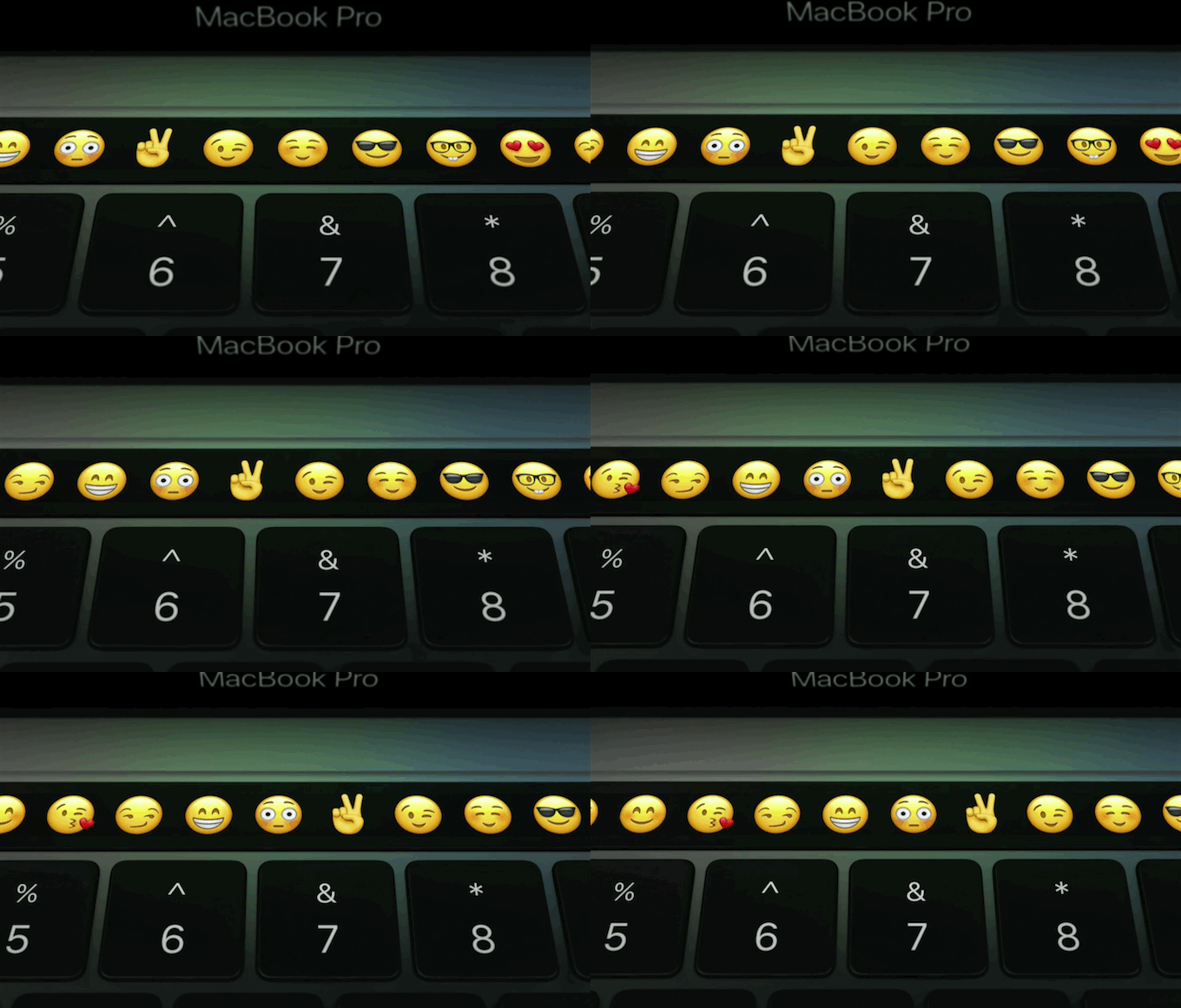
Apple introduced their latest versions of the MacPro line of laptops. You can read the details below, but their big innovation was the Touch Bar. This replaces the F-Keys that have been on computers for years. The bar changes depending on the program that is running, and you can program your own icons. For instance, when writing a text message,you can see the emoji's running above. All well and good, but is it really a big innovation? And is it worth $300 more? That is the price increase for the same MacBook that I bought a year or so ago. For me, it is not. The Touch Bar is a nice innovation, but I can easily live without it.

On the other hand, Microsoft on Wednesday, showed off its new Surface Studio…a huge innovation in desktop computing. It has a 28” screen that works like a regular monitor, or folds almost flat down on the desk for drawing or other artistic endeavors. And besides using a keyboard and mouse, it also has a a small circular Surface Dial that works on or off the screen. When you put it on the screen, it offers an instant color dial you turn to change colors while working with a pen. It also performs other functions like erasing backwards or viewing previous versions of your work.

I was blown away by the creativity and engineering that went into this computer. It is not for most of us as it is $3,000, but design artists will snap it up as it is better than anything Apple or anyone else has to offer.

And speaking of creativity, Microsoft announced that the next upgrade to Windows 10 will be called The Creator’s Update. It will be out next Spring and will contain a new version of Paint called Paint 3D. They demonstrated how easy it is to create 3D images and use them in Word and PowerPoint. The purpose of the Creator’s Update is make us all more creative. More innovations are coming for Windows 10 as it is 5 months away. It will be free for Windows 10 users, of course.

It is plain to see that Microsoft is moving ahead with software and hardware innovations while Apple plugs along with few innovations, except perhaps in the iOS products…none of which were discussed today.

Below in the tech news section are articles talking about all the products that were introduced at each event, as well as two in-depth articles focusing on the two big products that I mentioned here. hope you find them informative. -JRC   

Tech News and Opinions

MacBook Pro with Touch Bar and a TV app for Apple TV: Everything Apple just announced

The new versions of the MacBook Pro have an innovative new input touch strip, the Touch Bar.


The new MacBook Pro is here

The company showed off the newly refreshed version of the Pro, featuring, as leaks suggested, a secondary display between the keyboard and screen.


These are the 3 biggest announcements from Microsoft's Surface event

Surface Studio, Surface Book and new Windows 10 features abound.


Microsoft's big-screen Surface Studio is an engineering marvel

The company thinks that being able to immerse yourself in a display of this quality, size and capability will change how people work


What’s New in Windows 10’s Creators Update, Arriving Spring 2017

These include the big features that were announced at Microsoft’s October 26, 2016 event, though we’ve also included a list of smaller features they didn’t mention, but we know are coming.


Computer Tips and Tricks

Pocket makes it easier for avid readers to binge on the Web's best articles

Pocket, is introducing many new features to make it easier for people to find great stories to read in their browser.


Microsoft adds macro blocker to Office 2013 to stymie old-school attackers

Microsoft says it has added a malware-in-macros blocker to Office 2013 after customers demanded that it expand the feature beyond the latest version, Office 2016.


The Best Free Antivirus Protection of 2016

Even if you've upgraded to Windows 10, you shouldn't rely on Microsoft's built-in antivirus when the top-rated free utilities are so much more effective.


3 handy image tools you can use in File Explorer

File Explorer's Manage tab for photos has some quick-and-easy photo-management tools for Windows 8 and Windows 10 users.


How to pin the Recent Items folder to File Explorer in Windows 10

Access a comprehensive list of all your recent content.


Mobile Computing

Google Calendar 5.6.2 adds a Month view homescreen widget

Originally, the redesigned Google Calendar 5.0 annoyingly lacked a typical month view in its initial release for phones. Long since restored, Google Calendar is now finally adding a very useful Month homescreen widget.


Hundreds of Millions of People Are Using Smartphones You’ve Never Even Heard Of

"I love the screen on your Oppo R9, but have you seen the camera on my Vivo X7?"


This Android keyboard trick fixes bad autocorrect suggestions

Get rid of autocorrect's bad habits by taking out the trash.


Apple postpones the AirPods release date to ???

Originally, the new Apple AirPods were set to hit stores in October, but that's not going to happen.


How to Troubleshoot Bluetooth Problems on Your iPhone or iPad

Bluetooth can be a little finicky on its best of days. There are several possible points of failure between your iOS device and whatever accessory you’re connecting to. Here’s how to troubleshoot them.


Twitter is discontinuing Vine, but existing videos will live on for now

Twitter launched the Vine video sharing app in 2013, and it was a moderate success. Other apps added similar quick video features, but Vine never seemed like a high priority for Twitter.

Tuesday, October 25, 2016

You May Have Helped Bring Down the Net on Friday

In case you missed it, the Internet was brought to its knees all over the US  last Friday by a Denial of Service Attack (DDOS). Millions of devices participated in the attack, possibly some of them in your home! Perhaps not your computers or phones or tablets, but anything else you have connected to the Internet like your router, your TV, your set top boxes, your video recorders, and your Internet-of-things devices like security cameras, thermostats, doorbells…just to name a few.

These devices have little, if any security and are easily hacked. Hackers planted a simple program in them, that when activated, starts sending out signals requesting access to one company…in this case a little known company called DYN that acts as a giant switchboard for the Net. With millions and millions of requests all coming in at once, the company is basically shut down, thereby bringing down major services like Twitter, Reddit, and many others who rely on that company for connectivity. The outage spread all over the country and even to Western Europe.

No one knows who did this, but you can count on the fact that it will happen again. You see, access to this DDOS software is available on the Net. With little or no security on these millions of devices, they can be activated again and again with the same results. Unfriendly countries like Russia or North Korea, or organized crime or even malicious teenagers could start another attack. The Department of Homeland Security, which is supposed to be in charge or protecting us from these cyber attacks, is a joke!

With billions of more home devices coming on-line over the next few years, we could be in deep, deep trouble as the manufacturers buy cheap parts from Asia that are easily hacked. I strongly suggest you read our first three stories to learn about what happened and, more importantly, what will happen. -JRC


Tech News and Opinions

A New Era of Internet Attacks Powered by Everyday Devices

The attack on the infrastructure of the internet, which made it all but impossible at times to check Twitter feeds or headlines, was a remarkable reminder about how billions of ordinary web-connected devices — many of them highly insecure — can be turned to vicious purposes.


More than 10 million devices helped take down the internet on Friday

The attack used a piece of code that combs the internet for connected devices with weak security, then hijacks them to be used in distributed denial of services (DDoS) attacks.


Chinese firm acknowledges inadvertent role in cyberattack

A Chinese firm that makes components for surveillance video cameras now admits their technology was used, in part, to carry out the unprecedented strike.


Apple Sold 70% Fewer Apple Watches This Summer Compared to Last

The decline can be at least partially attributed to the lack of an Apple Watch refresh until the final two weeks of the quarter, when the Apple Watch Series 2 and slightly updated first-generation models launched.


Cause of Galaxy Note 7 overheating reportedly still a mystery

Nearly two months after Samsung announced a global recall of its new Galaxy Note 7, the electronics giant reportedly still doesn't know what is causing some phones to overheat and catch fire.


Computer Tips and Tricks

Microsoft: Beware this fake Windows BSOD from tech support scammers' malware

Microsoft is warning Windows users over a fake Microsoft security product that locks an infected computer and tries to trick victims into calling a support hotline.


How to Monitor Your Computer’s CPU Temperature

There are quite a few Windows programs that you can use to monitor the temperature. Here are two of our favorite options.


How to Get Free (or Cheap) New Ebooks

How do you get the big-name authors in a digital form without it being illegal or waiting forever? Here's how.


60 common Windows 10 problems and how to solve them

If you're suffering with the operating system, we've compiled a guide to 60 of the most common Windows 10 problems, as well as instructions on how to fix them.


31 Hidden Chrome Features That Will Make Your Life Easier

Check out our updated list of Chrome browser tricks. Even if you know some, you won't know them all.


Mobil Computing

OneNote updates include multi-window support, more embedded file types

OneNote has become the note-taking app of choice for a lot of former Evernote users and Microsoft is making sure that people will not regret their choice to switch.


Upgrade your camera without upgrading your iPhone

Want a better camera but don't want to upgrade to iPhone 7? There are apps and accessories for that!


Why emoji matter

As a means of communication, the written word often comes up short. For iOS devices.


6 more ways to make the most of Mail for iOS 10

Customize the Mailboxes screen, tinker with iOS 10's mail filter, pick new message-swipe options, and more.


Android Pay teams up with Masterpass and Visa Checkout to make online shopping easier

Google officially announced today that it is partnering with Visa and MasterCard to enable Android Pay when checking out at websites that support Visa Checkout and MasterCard’s Masterpass.


Google Play Music: the Ultimate Guide

There is more music than you can imagine right at your fingertips.

Friday, October 21, 2016

Microsoft and Apple to Make Big Announcements

mac-surrender-smalljpg.jpg
Over the next couple of weeks, Apple and Microsoft will hold special events to announce new products. Next week, October 27 to be exact, Apple will likely announce all new MacBooks. It’s about time. Apple has not updated the MacBook Pro or the MacBook Air in three years. They updated the newer MacBook not long ago, but because of its smaller screen, less powerful processor and having only one USB-C port, it is not a big seller. But, is it too late for new Apple laptops? Our first article explores that possibility.

On November 2, Microsoft’s event will probably focus on it’s Office line of products and possibly an updated Skype. We could also see new Surface Tablets. The company has been very cagey about it is going to announce at this event.

One thing is for sure: Microsoft has been out-innovating Apple for some time now. You may have seen the recent ads showing Apple’s iPad Pro as a laptop alternative…followed quickly by Microsoft’s ad showing the Surface tablets to be a far superior alternative. And I agree with Microsoft…the iOS operating system limitations, for me anyway, exclude any iPad tablets as a serious computer. The iPad is great and I love mine, but not as laptop computer.

On the other hand, the Surface tablets run a full Windows 10 OS, the same as a desktop computer and laptop. So the Surface can be used as a laptop. In fact, if my MacBook Pro and Samsung laptop both disappeared and I could only purchase one new laptop, I think I might just purchase a Surface or some other Windows-based laptop to replace them both. 
 
But I withhold judgement on that until after the two companies make their forthcoming announcements. I will be watching both and will report back to you on what is covered at these two events. So stay tuned! -JRC

Tech News and Opinions

Has Apple given up on the Mac?

Opinion: Apple is rumored to be preparing a long-overdue update to its Macbook line, but will this be too little, too late? In the PC business, Microsoft is wearing the innovation crown these days.

 Apple: 90 percent of 'genuine' Apple items on Amazon are fake

Apple is suing an electronics distributor over what it says are bogus Apple accessories sold on Amazon.

 FCC chief: We're here to reinforce consumer rights

Commentary: Chairman Tom Wheeler says the FCC is working hard to protect your privacy and allow you to watch pay-TV programming without renting a set-top box.

Microsoft Has a Bill Belichick Problem

New England Patriots Coach Bill Belichick has spent his career destroying the hopes and dreams of the competition. But now he’s turned his ire on Microsoft’s Surface tablets. And the results are not pretty.

 Did trolls cost Twitter $3.5bn and its sale?

Walt Disney and Saleforce reportedly decided not to pursue a bid for Twitter Inc. partly out of concern that bullying and other uncivil forms of communication on the social media site might soil the company’s wholesome family image


Computer Tips and Tricks

Complete Guide to Windows 10 Version 1703

This article will collect the new features as we discover them and expand over time into a complete look at what’s new.

 How to find out what Facebook knows about you

Facebook uses your online activity to build an advertising profile about you. Here's how to look at (and edit) some of that information.

 How to Delete Your Facebook Account

Sick of the world's leading social network? Say good-bye to all those "friends" by following these instructions.

 Here's everything that's included with Amazon Prime

Here's a look at every single benefit included with Prime -- along with a few Amazon services you might think are included, but actually cost extra.

 12 Ways to Secure Your Wi-Fi Network

Worried about the security of your Wi-Fi connection? Follow these steps and you'll be in a wireless Fort Knox.


Mobile Computing

Apps for easy photo sharing

Make sharing photos with friends even simpler. For iOS and Android users.

 Duplicating a Photo in the iOS Photos app

One of the smaller features that Apple quietly snuck into iOS 9.3 is the ability to create a duplicate of any given photo or set of photos in the iOS Photos app.

 Best free Android games 2016

The best free games on Android for phone and tablet.

The Best Android Tablets of 2016

No love for the iPad or Windows slates? Here's what to look for in an Android tablet, along with the top-rated models we've tested.

 The Best Windows Tablets of 2016

Today's tablets offer full Windows PC power in a convenient, touch-friendly form factor. Here's what you need to know when shopping for one, and our top recommended models.

 How to set up automatic iCloud backups for your iPad

If you still haven’t ever backed up your device, pay close attention. These few easy steps are so painless and important.

Tuesday, October 18, 2016

A Detailed Look At Two Top Flagship Phones

Longtime readers know I seldom publish reviews of smartphones in this blog. The reason? There are just too damn many of them! 99% of them all run some version of Android. I could get bogged down forever in phone reviews. But today I am going to publish two reviews of the two most important smartphones on the market today.

They are both flagship phones of their respective manufacturers and both are flagships of the two main phone operating systems, Android and iOS. I classify them as the two most important phones on the market today because they are. There were three, but with the recall of the disastrous Samsung Note 7, only two remain.

One, of course is the new Apple iPhone 7 (and 7+). The other is the new Google Pixel phone (also in two sizes). I choose the latter as the most important phone in Android because the Pixel runs the pure Android OS as originally invented by Google. The other top brands, including Samsung run their own modified versions of Android. With Samsung now out of the picture, fans of Android should look at the Pixel first before buying any other brand. Yes, there are other good phones running Android, but the Pixel is the only one with pure Android.

Why is that important? Because as new versions of Android come out, the Pixel is the only one that will get the newest version right away. The only other brand on the market that can make that claim are Apple iPhones. Google has done an excellent job improving Android over the years, but most Android phones have to wait a long time to get the new improved versions…many never get it. Only about 4% of current Android phones have Nougat, the latest version. Only 10% have the previous version. That is shameful.

Much of the blame for that falls on the phone carriers. But also, blame must be shared with phone manufacturers who modify Android, including Samsung. Apple did a good job many years ago insisting they send out their own updates without carrier intervention. That is one of the many reasons I love the iPhone. Now, Google will be doing the same thing.

If I ever were to switch to Android, it would be for the Pixel phone. It has many features that no other Android phone has. That is why I consider the Pixel the top of the Android line. But there are drawbacks to both the Pixel and the iPhone 7…the main one if price. Both phones are the flagships of their respective manufacturers and both carry hefty price tags. In fact, both phones are priced nearly identically.

There are in-depth reviews of both phones below in the “Mobile Computing” section of this blog. I suggest you read them both before buying your next phone. You might also want to check out the other stories here for more good information. -JRC 

Tech News and Opinions

CIA reportedly plans to launch a cyberattack against Russia

The White House asked the CIA to present it with several "clandestine" cyber operation tactics that the administration can choose from.


Microsoft's ship target for Windows 10 'Redstone 2' is March, 2017

Microsoft's internal ship target for its next major update to Windows 10, a k a 'Redstone 2,' is looking like March 2017.


MacBook Airs and Microsoft Surface haven't stopped the PC slide

The device market is set to decline for the second year running as PC struggles to redefine itself.


20 Things You Didn't Know Your Chromecast Could Do

Besides all the things Google can do, the search giant can also take over your TV with its Chromecast, a streaming dongle that got a colorful makeover last year.


Donald Trump’s mail-servers are running Windows 2003

A security researcher had a look at the mail servers operated by the Trump organization and found a veritable dumpster fire: systems running Windows 2003 (!), unpatched, badly configured.

Computer Tips and Tricks

How Clean Up Windows 10 With the Refresh Windows Tool

Microsoft's Refresh Windows tool can rid your Windows 10 PC of junkware and return it to a clean, pristine state


How to Juggle Multiple Windows 10 Apps With Virtual Desktops

Got too many apps or windows open on one screen? Organize them with Windows 10's Virtual Desktops.


Amazon Prime now includes a 'Family Vault' for sharing photos

Up to five users can upload unlimited photos and 5GB of video.


Making your home a smart home is easier than you think!

Just add connected light bulbs, plant sensors, smart locks and more. Visit now to learn how to connect your home devices to the internet the smartest way possible.


10 Tips For Using And Tweaking Microsoft Cortana In Windows 10

Microsoft's virtual voice assistant can handle a host of tasks for you in Windows 10, from opening an app to providing the latest weather forecast. Let's check out how to use and customize Cortana to work its magic for you.
 
Mobile Computing

Google Pixel XL review: The best Android phone money can buy

Keep in mind that these flagship phones, which start shipping on October 20, are aimed directly at Apple’s iPhone and Samsung’s Galaxy devices, which is also reflected in their pricing.


Switching from iPhone to Android: Everything you need to know

If you've never used an Android phone before, there are a few things you should know before taking the leap.


How to Switch to iPhone From Android: Patience and Persistence

Switching phone operating systems should in theory be simple. But it can be a little more complicated than advertised.


iPhone 7 review: One month later

Now, having lived with either the regular sized iPhone 7 or the larger iPhone 7 Plus for four weeks, we've had a real chance to test it out.


New Google Flights alerts make sure you don't pay sky high ticket prices

Everyone seems to have a different idea of how far in advance you should book flights and hotels, but the latest update to Google Flights wants to make sure you don’t get caught by a sudden price hike.


The Best Cheap Cell Phone Plans You've Never Heard Of

There are a lot of smartphone options beyond the big four carriers in the US. If you're looking to save money, these lesser-known plans might be the ticket.

Thursday, October 13, 2016

Do you Roku?

Image result for Netflix photos

So how many video streaming services do you have in your home? I personally have several, all on my Roku box. There are far more channels than I can ever watch. I subscribe to Netflix (of course), Amazon Prime, Acorn (British Television) and several others I get for free. And it seems the number of people like me are growing.

Of course, I cut the cable cord when I moved into my new place 14 months ago. I can use a Mohu Leaf antenna to bring in all the local stations for free when the needs require. I hate watching regular TV or even cable channels because of all the commercials they run. The mute button is a wonderful invention. The nice thing about Netflix, Amazon, and Acorn is there are no commercials. If I need a break, I just hit the pause button.

Anyway I won’t rattle on any more about my viewing habits. I just found our first story interesting.

PS: If you have a Roku device, you might want to search out an app called “Pear.” You need to find it on the Net as it is an unauthorized Roku channel, but it is legal. It has hundreds of cable channels on it for free and a few other channels that you can’t find anywhere else. For instance, they have one channel that shows episodes of The Big Bang Theory one after another with no commercials. Another shows Seinfeld. How they do it, I don’t know. But its easy to get and free.

Anyway, on with the show!! -JRC

Tech News and Opinions

Video Streaming Like Netflix and Hulu Are Getting More Customers

As the number of streaming video services proliferate, about 16% of U.S. video viewers have signed up for more than one online streaming service, up from 10% three years ago


Yahoo's spying billboard: It would ID you, watch and listen to your reactions to ads

Yahoo is exploring a smart billboard that would use microphones, cameras and other sensors to bring targeted advertising to outdoor displays.


Amazon's full on-demand streaming music service launches

The company is launching its new service as Amazon Music Unlimited, a on-demand competitor to the likes of Spotify, Apple Music, and Google Play Music.


Opinion: Why does Siri seem so dumb?

And if it doesn’t get smarter soon, what does it mean for Apple?


FCC fines Comcast $2.3M for wrongful customer charges

Media company Comcast will pay the penalty to settle an investigation into whether customers were wrongfully charged for products and services.


Computer Tips and Tricks

Google Photos can now turn videos into GIFs, fix sideways photos & more

The company is upgrading its service again, with a bevy of new features aimed at helping you revisit your memories and generally better enjoy your photos.


Quicken 2017 available for macOS, iOS, Windows, Android OS

"Quicken 2017 is now available for Mac and Windows system. The new product line offers users a revamped interface, a mobile app that’s iPhone/iPad compatible, and new investment, reporting, and bill pay capabilities.


16 useful Windows 10 tools that help you get more done

Microsoft managed to sneak even more productivity-enhancing goodies into every nook and cranny of Windows 10. Then the sweeping Anniversary Update added even more still. So let’s take a look.


18 Tricks to Make Yourself a Microsoft Excel Master

The number of ways you can use Excel is countless, and so are the number of features packed inside Microsoft’s most popular number-crunching application.


Microsoft Delivers Windows 10 Cumulative Updates

Microsoft has issued separate cumulative updates for each of the shipping versions of Windows 10. And while none include new features, of course, each includes important fixes. Make sure you get it.


Mobile Computing

The Best Samsung Galaxy Note 7 Alternatives

You must return your Samsung Galaxy Note 7 now. So what do you get to replace it? We have some solid suggestions.


Amazon will refund Note 7 accessories even if outside return window

The Galaxy Note 7 is dead: Amazon knows this and is apparently offering customers who bought Note 7 accessories a full refund even if they’re outside the normal 30-day return window.


How to encrypt your Facebook messages with Secret Conversations

Facebook's new encrypted messaging feature, Secret Conversations, is now live for everyone on Android and iOS.


How to Transfer SMS Messages from One Android Phone to Another

Getting a new phone is rough. While some things automatically come with you through your Google account, other creature comforts, like your text messages, don’t automatically sync.


How to Disable 'Press Home to Open' in iOS 10

iOS 10 makes you touch and press to unlock via Touch ID. Here's how to ditch that extra step.


iOS 10 adoption already topping 54%!

According to the official App Store numbers iOS 10, is now installed on 54% of iPhones and iPads. That install base was achieved in less than a month.

Tuesday, October 11, 2016

End of Story: Samsung’s Galaxy Note Now Officially Dead

Samsung Permanently Stops Producing Galaxy Note 7 Smartphone

You are probably as sick of this story as I am. But this should be the very last time it is mentioned here. Samsung has officially killed production on the Galaxy Note and issued a world-wide recall on this ill-fated smartphone. As you may recall, they were selling replacement models that had supposedly fixed the issues with the exploding batteries, but  more and more reports of explosions and fires with these replacement phones began to surface. One report even had a phone catching fire in a child’s hand while another story reported last week had an airplane evacuated when one caught fire. Not good.

So now, Samsung has killed it completely. Too bad…early review of this phone were quite good. There were even reports of some people not wanting to give it up after the first recall. But  now, to keep one would be just stupid. If you still have one, return it and get a different phone.

One interesting sub-story: The boxes that Samsung is sending out to people to send back their phones are supposedly fireproof.  The return kit includes three boxes and a static shielding bag. The Note 7 is supposed to be slipped into the bag and then enclosed in box after box. It's the outermost box that's most interesting: it's lined with ceramic fiber paper, which is capable of handling extreme heat. Only time will tell how bad Samsung’s smartphone reputations has been damaged.

There are some interesting stories and tech tips in this edition so why not get started now to see what I have put together.  -JRC

Tech News and Opinions

The Galaxy Note 7 is dead

Samsung ends production after issuing worldwide recall


Yahoo Mail makes it hard to leave, disables auto-forwarding

The company says it's just working to make the feature better, but angry users ready to ditch the beleaguered email service don't buy it.


Where's the bottom for Microsoft's Internet Explorer?

Losses continue to accumulate as another 33M users desert IE or Edge in September


US officially blames Russian government for election-related hacking

The US alleges that the Russian government compromised the emails of officials and institutions


Three More Law Firms Are Suing Apple for Ignoring iPhone 6 Plus 'Touch Disease'

There is increasing pressure on Apple to explain why it's ignored the fact that touchscreens on thousands of iPhone 6 Plus devices have stopped working, leaving consumers on the hook to replace devices that have a fundamental engineering flaw.


Computer Tips and Tricks

How to Back Up, Restore Your Documents in Windows 10

Using Windows 10's File History feature, you can tag specific folders so they're automatically backed up to an external location and recoverable in a pinch.


How to add your calendar events to the Google Maps app

Events added to your Google Calendar -- either manually or automatically via Gmail -- will be viewable in Google Maps for quick access to directions to your upcoming events.


How to Use and Tweak Your Windows 10 Lock Screen

The Lock screen may seem like an obstacle, but it offers helpful information and customization options.


Windows 10 Tip: Get Cortana Insights with Sticky Notes

With the Anniversary Update for Windows 10, Sticky Notes get a nice Ink-enabled update, but the biggest change, perhaps, is support for Cortana Insights, which lets you set reminders, call written phone numbers, send an email message, view web address, and more.


Need A Personal Information Manager? Here's A Free One

It's a Windows program which offers a really nice calendar, notepad and task list. There's even an email client built in.


Mobile Computing

How to Minimize Your Android Data Usage and Avoid Overage Charges

Increasingly sophisticated phones and data-hungry applications make it easier than ever to blow through your cellphone plan’s data cap. Read on as we show you how to manage your data use.


How to Add Pie Controls to Your Android Phone, No Root Required

If you’ve never used pie controls on your Android device before, you’re missing out. Pie controls are a unique way of quickly accessing your navigation keys and other shortcuts that don’t take up any space on your screen — you simply swipe in from the side to bring them up.


5 awesome Android widgets for a more useful home screen

Whether you're looking to speed-dial friends or quickly scan documents, these widgets will help you get stuff done.


How to Add Pie Controls to Your Android Phone, No Root Required

If you’ve never used pie controls on your Android device before, you’re missing out. Pie controls are a unique way of quickly accessing your navigation keys and other shortcuts that don’t take up any space on your screen — you simply swipe in from the side to bring them up.


iPhone and chill: Six sensational stress reducers!

Our lives can be stressful. Here's how your iPhone can help!

Friday, October 07, 2016

Galaxy Note 7 Replacement Goes “Boom” on Airplane

If you thought the Galaxy Note 7 Replacement phones might be safe from explosive batteries, you may have to do a rethink. Samsung recalled all the previous versions, then started shipping replacements into stores. All appeared well until a replacement phone caught fire on a Southwest flight. The plane, which was still on the tarmac (thank God) had to be evacuated and all ended well…except for maybe Samsung’s reputation.

I am sure Samsung thought they had figured out the problem with the original Note 7. So it will be interesting to see why this one went boom. I know flight attendants now go up and down the aisle on all flights looking for Galaxy Notes. When they find one, the owner is told to turn it off and leave it off. Perhaps they missed this one, or the owner hid it. Who knows?

Anyway that is the big story of the day and I don’t have anything else to add. So I hope you find some treasures here and also hope you have a great weekend. -JRC

Tech News and Opinions

Replacement Samsung Galaxy Note 7 phone catches fire on Southwest plane

All passengers and crew exited the plane via the main cabin door and no injuries were reported

Amazon Launches Prime Reading

Now, Prime subscribers in the United States can enjoy unlimited reading from a rotating selection of books, magazines, comics and other Kindle-based content at no additional cost.


Yahoo reportedly scanned all user emails for US intelligence

CEO Marissa Mayer complied with a government directive to scan hundreds of millions of incoming messages, according to Reuters.


Apple officially launches new ‘Spoken Editions’ section in iTunes & Podcasts app

Spoken Editions are narrated pieces of content from a variety of online publishers. Spoken Editions are available in iTunes on the Mac and PC as well as Apple’s first-party Podcasting app for iOS."


Pilots, air traffic controllers shifting to text messaging

Airline pilots and air traffic controllers are on schedule to switch to text communications at most of the nation's busiest airports by the end of the year, a milestone that holds the potential to reduce delays, prevent errors and save billions of dollars in fuel cost, says the Federal Aviation Administration.


Computer Tips and Tricks

5 tips for selling on Marketplace, Facebook's version of Craigslist

The new Facebook Marketplace lets you sell to anyone (well, anyone within 100 miles of you), rather than limiting you to friends or group members.


Hands-On With the New Outlook.com

Microsoft is finally nearing the completion of its migration to the new Outlook.com, which brings the look and feel and some of the functionality of the commercial Office 365 offerings to consumers. Here’s a quick look at some of the key changes.


How to Set Your Google Account to Automatically Delete (or Share) Upon Your Death

Let’s take a look at how you can put your Google account on autopilot when you’re no longer at the wheel.


Enable TCP Fast Open in Edge browser to make pages load faster

When TCP Fast Open is enabled, data can be sent before the connection completes, so that responses will arrive mush faster.


Microsoft puts AI to work in Office 365

You'll hardly have to lift a finger to complete some tasks.


Mobile Computing

25 best Android tips to make your phone more useful

Google is always adding new features and making changes to existing ones, and OEMs like Samsung and LG can add their own stuff on top of that. It can be hard to keep up, so we’ve gathered the 25 best tips for your Android phone right here.


30 Hidden Tips for Mastering iOS 10

iPhone power-users will want to know exactly what's in store. These 30 tips cover the best new features that aren't always obvious when first using iOS 10.


Five tips for buying a used iPhone

Thinking about purchasing a used iPhone? Make sure you do some research first!


Pixel, Galaxy, iPhone, oh my! Why pay a premium when every phone runs the same apps?

When you start talking about a $400 to $600 difference in price, the mystique and perceived advantages of a brand and OS platform starts to look a bit silly when they all run the same applications.


Let Apple create some Memories for you

"You make the memories, Apple gives them some structure."


Keep Chrome Web Pages From Jumping Around on Your Android Device

If you use Chrome on your Android phone, you may have noticed a little quirk when you open a new tab. As the page loads, your pages will jump around.

Tuesday, October 04, 2016

Google’s Big Day in the Sun

Pixel Phone Colors.jpg

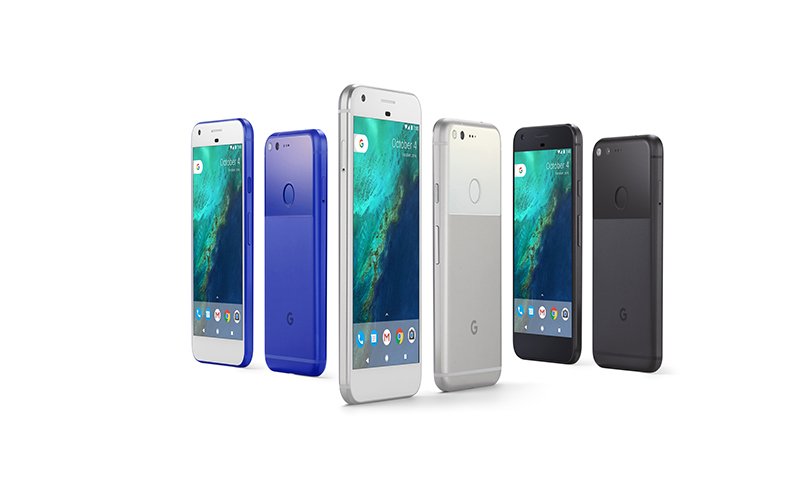
Google held their big product announcement today in San Francisco. The highlight was their new line of phones, call the Pixel. They have dropped the Nexus line of phones in favor of this new brand. It is an impressive phone, at least from what was shown on stage.

I was impressed that, like the Nexus, it will always be updated with the newest Android OS…just like Apple does with the iPhone. Other Android phones have to wait for updates to come from the carrier. Sometimes that takes months and sometimes that never happens. Just for that reason alone, I would consider a Pixel if I wanted to change to Android. Of course, time will tell if this is a good phone…but so far so good.

As part of the new phone, Google also introduced Daydream, a virtual reality system that is included with the phone. All that is needed is a VR headset, also built by Google. The phone slips into the headset and connects automatically. Slip it onto you head and you are in a VR world. The headset will sell for $79…a bargain when compared to other VR headsets. Will be looking forward to hearing more about this.

Other items announced and/or released include Home, a small box similar to Amazon’s Echo; Google Wi-Fi, a router that can be used all over your home to improve signal strength. It is impressive as it is only $129, compared to a similar device from Eero that is $199; a new Chromecast Ultra that will deliver 4K content to your TV…priced at $69.

Also highlighted throughout the event was Google Assistant, a voice search device similar to Apple’s Siri and Microsoft’s Cortana. It is impressive and will work with all your Google devices.

You can read more about these products and more in our first story.  But the fun doesn’t stop there. We have lots more news as well as tips and tricks for your computing devices. So let’s get started! -JRC


Tech News and Opinions

Google's Big Announcements

After all the leaks there were few surprises, but the theme was Google Assistant Everywhere.


Google's Project Shield defends free speech from botnet scourge

It's an effort to save journalists, activists and others from botnets of hacked DVRs and security cameras used to swamp websites with data.


'Stop Obama handing over US internet control': Four states sue in last-ditch bid

A last-minute law suit aims stop the Obama administration from giving up its oversight of the internet's naming system.


FBI reports more attempts to hack voter registration system

There have also been 'scanning activities,' which could be preludes to attacks


Facebook Marketplace wants to be the new Craigslist

The social network on Monday unveiled Marketplace, a new section of its mobile app that lets people list their furniture, cars and clothes for sale to any Facebook users in their area.


Computer Tips and Tricks

10 Tricks For Using The Windows 10 Anniversary Update

In August, Microsoft rolled out the first major update to Windows 10, packing new and enhanced features. How do you access and use them? Let's take a look.


G Suite: The new Google office in the cloud

Google isn't just consolidating its end-user cloud services, it's integrating them into a smarter, more useful cloud office suite.


How to Use and Tweak Your Windows 10 Lock Screen

The Lock screen may seem like an obstacle, but it offers helpful information and customization options.


Uninstalling Fonts Probably Won’t Speed Up Your PC or Mac

You’ve seen it on plenty of PC help sites. “Uninstall fonts to speed up your computer!” Don’t follow this advice–it’s a myth.

Stop HTML5 autoplay videos in Chrome, Firefox, Opera (but not Edge, Explorer, Safari)

You may have conquered Flash videos, but now there's a new challenge.


Mobile Computing

Who Cares about 5G Wireless?--You Will

The Internet of Things, streaming virtual reality and many other much-hyped technologies cannot exist without a complete rethinking of how mobile devices get online


8 Amazing Photo Editing Apps On iPhone And Android

These apps will make you favorite photos look in better.


Hottest Android apps in September

iOS users, don't run away. Every trending app in the Google Play store has an iOS version, too.


How to change the home screen launcher on Android

Opting for a custom launcher is one of the fastest and easiest ways to customize your Android experience.


Get the iMore sticker pack for iOS 10!

Your iMessage conversations are pretty cool and all, but they're missing something: the iMore Sticker Pack, and it's calling your name!


30 Hidden Tips for Mastering iOS 10

These 30 tips cover the best new features that aren't always obvious when first using iOS 10.

Thursday, September 29, 2016

Yes, You Can Run Windows and macOS on One Computer

Have you ever thought about buying a MAC but held back because you have some Windows-based apps that you can’t live without? Now you can do it…and quite easily, I might add.

You have heard me here before talking about Parallels, the Mac-based software that allows you to run multiple operating systems on your Mac. Most people, including me just run Windows inside their Mac. But I could set up Linux and Windows if I want…or those two plus the Chrome OS…or even Android. But while running Windows on any of the others mention, I am running my macOS at the same time. 

There are indeed some programs that are better on Windows than Mac.The software I use to write this blog isn’t even available for Mac. And most browsers have more features for Windows than Mac. But now, I can run Firefox or Chrome on Windows while running on a Mac. Our first story in the Computer Tips section, written by Walt Mossberg, is all about Parallels and how he uses it.

And while I run Parallels on a big 27” Mac with 32GB of memory, Walt runs Parallels on on the least powerful computer in the Mac line, a 3-year old MacBook Air. And it runs just fine.

There is one thing that is not mentioned in his article…the fact that you can run Windows Programs side-by-side with Mac programs.  In the photo up above, you see a Windows Desktop sitting on top of a Mac Desktop. Well, you don’t have to have the Windows desktop showing at all!

On my computer, you don’t see the Windows desktop. But the Windows applications I use are listed below in the dock at the bottom of the screen. In the photo above, do you see a few icons in the dock that have 2 parallel red lines on them? That means they are Windows-based programs. Mac programs have no vertical red lines. It works like a dream. You would never know by looking at the screen that you are running Windows program. I love that feature.

Well, that is a quick look on how Parallels works, just in case you ever think of switching. Be sure and take a look at the first story in the Computer Tips section for more detailed info. -JRC

Tech News and Opinions

Moscow Dumps Microsoft Products And Services

Russian president Vladimir Putin wants his country to reduce its dependence on technology from North America and Europe.


Verizon technician admits he sold customer data for years

And he’s facing five years in prison on federal hacking charges because of it


BlackBerry is officially getting out of the phone hardware business

BlackBerry's transition to a software company is complete. During its Q2 2017 earnings today, CEO John Chen announced that the company "plans to end all internal hardware development and will outsource that function to partners."


Opinion: 10 utterly wonderful technologies you shouldn't buy yet

Yes, there’s amazing gear out there that will blow your mind if money is no object. But the cutting edge entails compromise, be it in the form of high sticker prices, bugs galore, and other issues.


Windows 10 hits 400 million users

Microsoft has done very well with its new OS, with Windows 10 becoming the fasting ever growing operating system for the company.


Computer Tips and Tricks

Running Windows 10 and macOS Sierra together

The new Parallels 12 does the job well, even on aging hardware


How to Use System Restore in Windows 7, 8, and 10

System Restore is a Windows feature that can help fix certain types of crashes and other computer problems. Here’s how it works, how to set it up, and how to use it when things go awry.


The Best Security Suites of 2016

Using your computer for games and social media is fun; keeping it safe isn't. A security suite can be your one-stop solution. We've tested almost four dozen of them, and these 10 get our highest recommendation.


The Best Expense Tracking Software of 2016

We test and compare 10 cloud software solutions that focus on expense tracking for small  to midsize businesses (SMBs) with mobile-enabled workers.


Twitter finally lets everyone create their own “Moments”

The company says that it’s opening up the Moments platform so anyone can create their own stories using tweets and photos uploaded to the service


Mobil Computing

Amazon Fire HD 8 Review & Rating

An 8" tablet for $90? You bet. And it is pretty good.


The Best Apps To Help You Be Productive And Organized This Fall

Stay on top of all your schedule and tasks all season long with these organizational and productivity apps for iOS and Android.


8 great Android features that iOS needs to steal

From native gesture typing to the ability to clear your app windows in one tap, and much more.


Apple releases iOS 10.0.2 to fix bug that shut off headphone controls

Well that was fast: Apple just released iOS 10.0.2, with the update's release notes confirming that it fixes an issue that caused Lightning headphone controls to be disabled after a period of inactivity.


Taking pictures and saving to photo library in iOS 10 Messages

Apple’s done some cool new things with the Messages app in iOS 10, including adding a live preview for taking photos right within a conversation.


How to use the second camera on the iPhone 7 Plus

The iPhone 7 Plus comes with an additional camera module around back. Here's what you need to know about how it works and how to use it.

Tuesday, September 27, 2016

Who Will Buy Twitter…Or Is It Even for Sale?

I have nothing really important to say in this edition so will let you take it from here. Thanks for being a reader. -JRC

Tech News and Opinions

Salesforce, Google, Microsoft, Verizon are all eyeing up a Twitter bid

Twitter continues to inch its way to a sale process, and the latest developments come in the form of alleged bids from potential buyers.


Google rumored to announce Wifi, Home and Chromecast Ultra hardware on October 4th

The rumor mill spins strong as we approach Google’s October 4th event, where the company is expected to unveil its latest hardware.


How to find out if you're at risk in Yahoo hack

If you're wondering what to do after hearing about the massive data breach, follow these steps to make sure you're safe.


Roku unveils five new streaming boxes with prices as low as $30

The $30 Roku Express is even cheaper than Google Chromecast, and actually includes a remote, while higher-end Premiere and Ultra boxes sport 4K and HDR video.

Windows 10 hits 400 million machines as growth slows post-free upgrade

That list includes a wide range of devices, including the standard PCs, phones and tablets, along with the Xbox One, Surface Hubs and HoloLens.


Computer Tips and Tricks

What to do when you hate Windows 10

If you're unhappy with Redmond's latest, you have a few options.

The Best Desktop Computers of 2016

Desktops deliver more power and flexibility than you can get from a laptop, and there are more designs than ever to choose from. Here's our buying advice, along with our list of the best models we've tested


Creating a New Desktop

Windows 10 includes the ability to create and use multiple virtual desktops. Perhaps you're working on a few projects at the same time and want to have the files and windows related to each project available on its own desktop. Now you can do it.


The Best Note-Taking and Syncing Apps of 2016

Jot down thoughts, snap pictures of things you want to remember, and keep them all at your fingertips, on various devices, with a top-rated note-taking app.


The Best Free Music Download Sites

There are plenty of places you can go to download songs to your local devices so you'll have access to them at all times.


Mobile Computing

5 awesome Android widgets for a more useful home screen

Whether you're looking to speed-dial friends or quickly scan documents, these widgets will help you get stuff done.


The Best Android Phones of 2016

Apple's iPhone not up your alley? Here's how to find the right Google-powered alternative, along with our top-rated Android phones.


How to Turn an Old Smartphone Into a Dash Cam for Your Car

A dash cam can really come in handy in your car–not just to record meteors and flying cars, but more practical events like collisions and aggressive driving. But instead of buying one, you can just use equipment you already have and a freely available app.


Top 10 Ways To Secure Your Mobile Phone

Mobile malware is a frontier ripe for cybercriminal activity. The reality is that as more and more people use their phones to go online, more cybercriminals will hear the call.


How To Fix Common iOS 10 Problems And Bugs

Here’s how you can fix some of the most common iOS 10 problems and bugs that you may be having on your compatible iPhone, iPad, or iPod touch device.


How to Take a Screenshot on Any Device

No matter what your platform, here's how to take a picture of what's on your screen.

Thursday, September 22, 2016

Better Change Your Yahoo Password ASAP

As soon as I read our first story here, I immediately changed my Yahoo password. Although you may not use Yahoo Mail, the company has several other properties you may use…like Flickr, Tumblr, Rivals, Autos, Finance, Finance, Messenger, Shopping, News, Sports, and Travel, just  to name a few. If you change the main Yahoo password, you should be good to go on all Yahoo-owned properties. So change your password today!

The latest update on the Yahoo data breach is the number of passwords stolen is around 500 million! Wow!! The breach occurred in 2014, so if you changed your password after that, you are probably OK. But, I would still change it anyway.The breach's revelation came about a week after Verizon bought Yahoo.

That is the big story of this day. But, I think if you look at the whole blog, you will find some very good tips and tricks for all your computing devices. So, until next week, keep smiling and have a fun weekend. -JRC

Tech News and Opinions

Yahoo is expected to confirm massive data breach affecting hundreds of millions of users

Following reports that Yahoo will confirm a data breach that affects hundreds of millions of accounts, some users reported Thursday on Twitter and elsewhere that they were prompted to change their email password when trying to log in.


Windows 10 Anniversary Update rollout may not be done until November

Microsoft is notifying Windows 10 users that the Anniversary Update may take three months to roll out. Here's why.


Microsoft Officially Ends Its Controversial Windows 10 Upgrade Practices

By placing a popup on the desktop, Microsoft was using ‘nagware’ to try and entice users to upgrade to the new OS. The company went as far as to downloading the bits in the background ahead of a user accepting the upgrade.


North Korea's internet revealed to have just 28 websites

The full scope of North Korea's private internet has been revealed after the country accidentally gave people outside of the country brief access to it.


Samsung will have 500,000 Galaxy Note 7 replacements in stores Wednesday

The company also says 25 percent of US customers have exchanged their potentially explosive devices for new models, up from 13 percent last week.


Computer Tips and Tricks

All the Ways You Can Still Get Windows 10 for Free

Windows 10’s free upgrade offer is officially over. But, unofficially, free copies of Windows 10 are still available. There are quite a few ways you can still get Windows 10 for free, without using a pirated license.


Windows 10's best tricks, tips, and tweaks

Windows 10, Microsoft’s back-to-basics re-embracing of the PC, is brimming with handy new features, and with all the new goodies come a legion of new tweaks and tricks—some of which unlock powerful functionality hidden to everyday users.


How to Use Your Google Calendar in the Windows 10 Calendar App

Thanks to the integration of desktop notifications and global compatibility with the rest of Windows 10 services, the process of getting your Google Calendar synced is easy.


Windows 10 Tip: Use the Dark Theme

The ability to switch between the standard Light theme and a new Dark theme is one of the more eagerly-awaited features in the Windows 10 Anniversary Update. But it’s not as simple as flipping a switch: There are a few additional things you need to know.


How to get Android notifications on your Windows PC

The Windows 10 action center can alert you to incoming calls, texts and app notifications on your Android phone.


Mobile Computing

10 Best Photo Editing Apps for Android [Free Download]

Here is a list of free ten best photo editing apps for android that will take your photography skill to the next level:


Google launches Allo smart messaging app for Android and iOS

Google today launched Google Allo, a messaging app for Android and iOS with Smart Reply and Google Assistant.


Hands-on: Google Assistant's Allo chatbot outdoes Cortana, Siri as your digital pal

Tucked within Google's unremarkable Allo messaging app is a real treasure: Google Assistant, which injects Google Now with an eager-to-please personality that finally provides the give-and-take other digital assistants lack.


Camera tests: Zoom on the iPhone 7 vs iPhone 7 Plus

How do the zoom features on the iPhone 7 and iPhone 7 Plus hold up in the real world? Join us as we take a closer look.


T-Mobile's 5G speed is mind-bogglingly faster than Verizon

The nation's third-largest carrier gets into 5G in a big way.


How to use your Android, iOS, or Windows 10 smartphone as a Wi-Fi hotspot

When you really need to access the internet from a PC, your phone can save the day.

Tuesday, September 20, 2016

The New MAC_OS is Here! The New MAC_OS is Here!

Image result for mac os sierra photos

While putting together this edition, I downloaded and installed the brand new MAC_OS operating system, known as Sierra, on my MacBook. This replaces the last version, El Capitan, and the one before that, Yosemite. Do you see the naming pattern here?

I know most of you use Windows and that is fine. I use both and love both. I write this blog on my PC, but still do about 70% of my work on the MAC. Each operating system has features that are better on one than similar features on the other. In truth, I have a love/hate relationship with both.

Sierra introduces SIRI to the MAC desktop. Siri is the voice command app that has been exclusive to iPhones and iPads. Now is is part of the MAC desktop. Of course, Windows has been running Cortana on the desktop for over a year now so Apple is playing catchup here. There are several other new features on Sierra, some of which are unique to Apple. If you would like to read more about Sierra, click on this link.   

Today, I also installed the latest version of Parallels on my MAC. In case you are not familiar with Parallels, the program allows users to run different operating systems on their MAC, including Windows 10. I have a second monitor connected to my MAC…so Sierra runs on one screen and Windows 10 on the other at the same time. Works like a dream. With 32 GB of memory on the MAC, I have no slowdown running two operating systems at the same time. So I guess you could say I have the best of both worlds. 

So that is my day. I hope your days and weeks are going well. Read on for more good information. -JRC

Tech News and Opinions

Apple iPhone 7 Has Two Nasty Surprises

The iPhone 7 is an early success, but two nasty surprises have been discovered which may cause owners of the iPhone 7 to regret their purchase


Comcast confirms plans to launch mobile phone service in 2017

It will run on Verizon airwaves and also lean on Wi-Fi.


Facebook, Twitter join effort to snuff out fake news stories

Social media giants join network of media companies and groups to improve the quality of information presented online.


Twitter's first NFL livestream scores a touchdown with fans

The social network received rave reviews Thursday for the first of its 10-game package of Thursday Night Football games, a slugfest between bitter AFC East rivals the New York Jets and the Buffalo Bills.


Cybercrime and cyberwar: A spotter's guide to the groups that are out to get you

Security threats can come from a variety of different individuals and groups. Here's a field guide to the major players.


Computer Tips and Tricks

How to Manage the Start Menu in the Windows 10 Anniversary Update

The changes aren't dramatic, but these tips will make the adjustments easier to swallow.


The Best Battery Life Laptops of 2016

Don't be left without power just when you need your laptop most. These models will all get you through a full day, and then some.


Mastering Excel Date & Time: Date, Days, Days360, Time, and Weekday

Calculate a day's serial number, move to a 360-day accounting calendar, and more


Make It Easier To Configure And Tune Your PC

Every time Microsoft releases a new version of Windows, they seem to make the configuration option screens even harder to find. Here is a free solution.


Google Drive Search Just Got a Lot Smarter

Google Drive is making finding your documents a lot easier and faster by unleashing the full power of the Google search engine. You can now search the way you talk, get spelling corrected, and more.


Mobile Computing

Word, Excel and PowerPoint for Android Updated with Simpler Sharing and Collaboration

This makes simpler collaboration and sharing simpler across all three apps. And Excel and PowerPoint both received their own app-specific updates too.


How to Add a Non-Google Email Account to Gmail on Android

Gmail now works with any kind of third-party email account that supports IMAP, so you can handle all your emails in one place.


Google Trips is a killer travel app for the modern tourist

Trips a new app that serves as a trip planner and travel guide for anyone who is exploring a new place. The free app is available on Android and iOS.


iPhone for the Windows Guy: Minimize Apple's Grip on Your Device

Microsoft fans who choose the iPhone or other Apple devices don’t have as many options as do those who choose the more malleable Google Android. But you can still minimize Apple’s grip on your i-devices, and on your life. Here’s how I do it.


6 ways to speed up iOS 10 on older iPhones

Is your iOS device is feeling sluggish after updating to iOS 10? Learn what you can do to put a little pep back in its step.


12 Must-Have iPhone Apps

Which apps are so essential that pretty much everyone will benefit from downloading them? Here are a dozen top-notch titles that deserve a home on your iPhone. Bonus: They're all free!

Friday, September 16, 2016

This Week in Smartphones

7e202fd162d9f2d3fb025856a1ec8a136227cc48

Sorry I am late getting this edition of Rants and Raves on to the Net. My plans were changed at the last minute and I wound up spending extra time in Yuma. But I am back in Tucson now and working hard to get my normal life back on track after 6 weeks on the road. But it was worth it.

The biggest news in the world of smartphones is, of course, the recall of all Samsung Galaxy Note 7’s. The reason: some of them have exploded. It’s a relatively small number compared to the 2.5 million phones sold. But the federal government, with the full cooperation of Samsung, has issued the official recall for all those phones.

Airlines are refusing to let passengers with the Galaxy Note use them on flights and banning them from being packed in suitcases. There are stories of exploding phones starting fires in cars and cafes and even in children’s hands. This is not good.

It’s too bad as the phone was widely reviewed as being an excellent product. Sales of all Samsung phones will undoubtedly suffer for the near future. If you take a Note phone into a cell phone carrier, they will not replace it with another Galaxy Note. You can get a new phone from a different manufacturer or your money back. For more info, see our first article.

It is widely expected that the chief beneficiary of all this will be Apple. Their new iPhone 7 is getting excellent reviews and costs about the same amount as the Galaxy Note 7…even without a standard headphone jack.

And speaking of Apple, I installed the new iOS10 system on my iPhone and iPad. There is a lot to it that I have yet to explore, but am slowly getting there. So far, I like it very much. I like the way they have improved the widgets page…a lot more useful widget and options. When you turn the phone on, swipe right and they will show up. I also love the the improvements to the Apple News App. I hope they will put News on the forthcoming MACOS update that will be released next week.

For more info on iOS 10, read the first article in our “Mobile Computing” section. I will keep exploring the new features and let you know. I think by next week, my life will return to normal and I can get these blogs out on a more consistent basis. Until then, enjoy what you find here. -JRC 

Tech News and Opinions

Here's why Samsung Note 7 phones are catching fire

The Samsung Galaxy Note 7 could explode. Read this to satisfy your burning curiosity.


15 Hidden Roku Tricks for Streaming Success

Whether you're a cord cutter or not, you're probably going to want a streaming device for your TV, and Roku remains the most popular.


Amazon Prime tunes into Audible

A new perk for Prime members. The e-retailer's membership service now includes Audible's monthly service for short-form audio programs and a new rotating list of audiobooks.


Google has a Plan to Stop ISIS Recruits

How do you stop a potential ISIS recruit? With information. That's Google's new plan to stop potential recruits before they become radicalized.


Why US internet controls became a political battlefield

This article demystifies the controversy over an Obama administration plan to relinquish the last scraps of government control over the internet


Computer Tips and Tricks

The Best Web Browsers of 2016

With new browser options like Edge and Vivaldi, the Web has become a much more interesting place. Here's how the newbies stack up against your old favorites on features and performance.


Microsoft is finally bringing desktop apps to the Windows Store

The Windows Store has always been used as a way to push Microsoft's new universal apps. Now, third-party developers can easily bring their existing desktop apps and games over to the universal app platform.


Windows 10 tip: Squeeze hours of extra life from your laptop battery

The new Battery Saver feature is set to turn on automatically when your battery capacity dips below a preset level. But why wait? Turn this feature on manually to get the most out of your system when you're away from a power outlet.


Why Your PC Hasn’t Received Windows 10’s Anniversary Update Yet and How to Get It

Windows 10 is supposed to automatically update itself. But it might take weeks or longer for a big update like the Anniversary Update to reach your PC. Here’s why that happens–and how to skip the wait


3 tips for taking faster screenshots in Windows 10

The default method of taking screenshots in Windows 10 is clunky. Use these tips to take faster and more precise screenshots without the need for an overpriced app.


Mobile Computing

iOS 10: All the New Features, Tips and Guides

Own an iPhone or iPad? Bookmark this guide to everything new in iOS 10.


Five security settings in iOS 10 you should immediately change

These tweaks will lock down your iPhone or iPad to protect your privacy.


Google’s VR Cardboard Camera app is coming to iOS

The odds of you using Cardboard Camera, Google’s simple app for creating 360-degree VR images, just got significantly higher.


Apple Quietly Updates the iPad

Put simply, you will save $50 to $100 on any iPad. Because virtually all iPads—certainly all mainstream iPads—now offer double the storage for the same price. Which again, is effectively a price cut.

Updated: The 100 Best Android Apps of 2016

Whether you have a brand-new Samsung device or an older Android phone or tablet you just want to spruce up, these are the apps that matter.


Marshmallow market share grows, Nougat nowhere to be seen

Want to see how Android is so fragmented? Check out this list of market shares for each version of Android.